RigPi-SDR

See the band.
Hear the action.

Turn your Raspberry Pi and a supported SDR into a receiver you can use from your browser. Spectrum, waterfall, audio and station controls come together in RigPi.

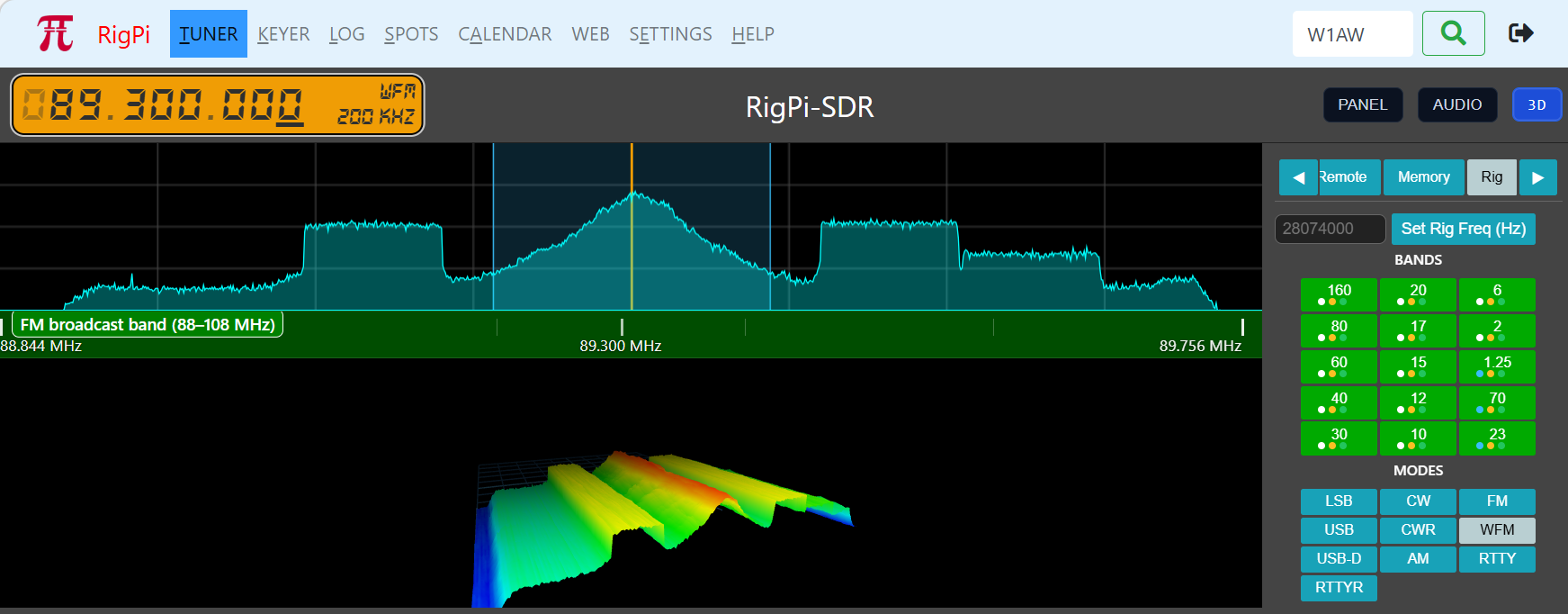
RigPi-SDR browser interface displaying an FM broadcast signal, spectrum, 3D waterfall and band controls
The existing RigPi-SDR screen, shown receiving an FM broadcast station with the 3D waterfall.
A live view of the band

Find a signal.
Then tune right to it.

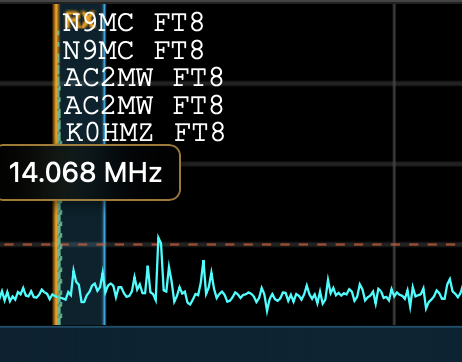
The spectrum shows what is on the air now. The waterfall shows how signals change over time. Click or tap a signal to tune, zoom into a busy part of the band, and adjust the receive filter to suit what you hear.

Choose a waterfall palette and floor level for your conditions, or switch to the 3D waterfall. RigPi-SDR can sit within your Tuner or Keyer page, or open in its own browser window.

Close-up of the RigPi-SDR spectrum with FT8 callsign labels near 14.068 MHz
An existing site image: spectrum detail with FT8 callsign labels.
Made for operating

More than a pretty waterfall.

Keep the tools you use close to the signals you are listening to.

Audio in your browser

Listen to SDR audio or the connected radio’s audio. For voice transmission, your browser microphone feeds the selected radio audio interface, with PTT through RigPi. Remote microphone use needs HTTPS and browser permission; an SDR receiver alone does not provide transmit audio.

Built-in FT8 decoding

Monitor FT8 and FT4 messages directly in the SDR panel, with callsigns, signal reports and grids. Receive decoding does not require WSJT-X. Use a configured digital program and connected transceiver for digital QSOs.

FIB & band intelligence

Frequency intelligence helps put the dial in context: band segments, customary activity and calling frequencies, and privileges based on your configured country, region and license. Activity guidance is a useful signpost; check your local rules before transmitting.

Memories that follow you

Save frequency, mode and bandwidth in twenty memories. Scan selected memories and pause on activity using squelch. Band buttons also recall digital, CW and phone settings, while your display and operating preferences are saved per user.
Your on-air companion

Ask. Speak. Operate.

RigPi brings an Elmer into the shack: help with questions, spoken interaction, and everyday station commands.

Ask Elmer

Ask about RigPi setup, troubleshooting or amateur radio in everyday language. Elmer draws on RigPi Help and other reference sources, identifies its sources, and can use available station information to help explain what is happening.

Elmer Voice

Tap Elmer PTT to ask a question or give a command by voice, then tap again when finished. Hear answers read aloud, or use live captions to transcribe and translate received audio. No wake phrase is needed.

Elmer Control

Type or speak commands from the Tuner or Keyer control drawer: “Tune to FT8 on 20 meters,” “Set CW speed to 22,” or “Split up 5 kHz.” Elmer shows proposed changes for confirmation when required, and checks the result when possible. You stay in control.

Elmer uses an internet connection and the connected RigPi Elmer Service. No ChatGPT subscription, OpenAI account or personal API key is required. Voice input needs browser microphone permission and a secure browser connection; use HTTPS for remote operation.

Shared stations

Your view. Your settings.

RigPi supports multiple users and multiple radios. Each SDR user can keep a personal display span, mode, filter and memories.

Users sharing one physical SDR also share its captured RF range. Moving the receiver beyond that range can affect other listeners. Separate SDR devices and configured instances let a station cover different ranges; the practical capacity depends on the hardware and Pi workload.

Choose your receiver

Local hardware.
Receivers around the world.

Connect a supported SDR at your station, or listen through a remote KiwiSDR or OpenWebRX receiver.

Airspy HF+

Airspy HF+ and HF+ Discovery provide a useful path for HF and weak-signal listening.

RTL-SDR & Nooelec

USB receivers for economical listening. HF support varies by model and setup; some use direct sampling or an upconverter.

SDRplay

Supported through SDRconnect: SDRplay receivers except the original RSP. Connection and available bandwidth depend on the model.

RX-888 MKII

Wideband reception with USB 3. A Raspberry Pi 5 is required for its high sampling rate; RigPi handles firmware loading automatically.

HackRF Pro

Supported for reception. HackRF transmission is not exposed or supported in the current RigPi-SDR release.

KiwiSDR & OpenWebRX

Browse remote receivers and bring their audio and waterfall into RigPi-SDR. Coverage and access depend on the remote host.

Available frequency coverage and spectrum width depend on your receiver, driver, connection and Raspberry Pi. Start with settings appropriate to your hardware.

Away from the shack

Same browser.
A different operating position.

Use a desktop, laptop, tablet or phone on your station network. With remote access configured, take the same interface with you.

The Raspberry Pi stays at the station with your radio and SDR. A secure remote connection brings the controls and audio to your browser. A remote receiver is another option for listening from a different location; it does not move your station’s transmitter.

Built for amateur radio

Free and open source.

RigPi-SDR is part of RigPi Station Server. It runs on your Raspberry Pi and is available under the MIT license.

Build on what you have.

The software is free. Supply your Raspberry Pi, supported receiver, antenna and any radio interfaces you need. Explore, adapt and contribute alongside the amateur-radio community.
Get on the air

Bring your station to the browser.

See how the pieces connect, or visit RigPi’s downloads and help.